Built for weekend pressure, not demo-day comfort

SkyVault by GDWizard00

A powerful dropzone video operations system for turning camera cards into edited videos, photos, socials, CDNB teasers, branded output, and customer delivery without letting the busiest part of the day become the weakest part of the business.

One workflow Video, photos, socials, CDNB, USB, and online delivery.
Owner control Templates, branding, music, overlays, and retention rules.
Token based Pay for successful output, not bloated subscriptions.
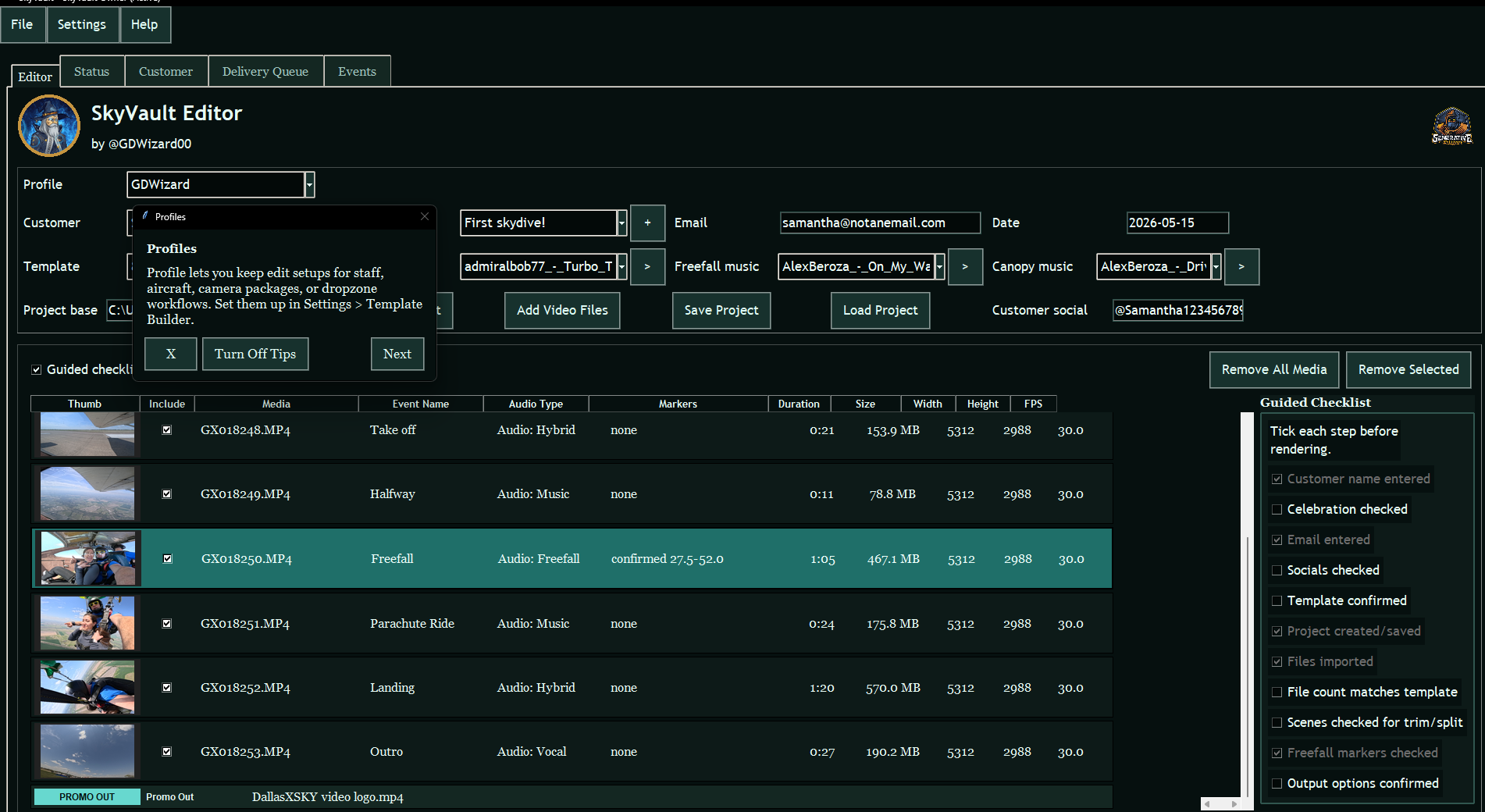
SkyVault editor with customer workflow, guided checklist, media rows, and output controls
The system

SkyVault is not just an editor. It is the operating layer around the edit.

SkyVault is designed for fast, professional, full commercial workflow: media intake, scene structure, music logic, branding, delivery, retries, token accounting, and customer-ready output.

Render without chaos

Templates carry scene intent, audio behavior, fades, still-photo capture rules, and output defaults so operators are not rebuilding the same decision tree all day.

Sell more from one edit

Full video, photos, Social Clips, Customer Did Not Buy teasers, overlays, branding, USB copy, and online delivery all belong to the same project flow.

Protect the business

Token accounting, delivery queue records, diagnostics, storage checks, and owner settings are built around real dropzone pressure.

Full video

Customer-ready edits with branded delivery paths.

Full video output is tied to the customer project, template, media rows, markers, audio behavior, overlays, delivery records, and token accounting.

Open full video example
SkyVault customer folder architecture with CDNB, delivery info, pictures, raw files, renders, socials, video, working files, and project JSON
Customer folders

Every customer gets a clean project structure.

SkyVault organizes output folders for CDNB, delivery info, pictures, raw files, renders, socials, video, working files, and the project record.

Customer still photos delivered in Google Drive
Google Drive stills

Photo delivery without hunting through folders.

Captured stills can be delivered through the owner Google workflow so the customer gets a clean photo set without extra manual sorting.

Gmail delivery template with video and photos links
Gmail delivery

Customer emails can carry the links and message.

SkyVault supports reusable Gmail templates for video links, photo links, review prompts, customer names, and dropzone-specific delivery language.

SkyVault social media video output preview
Social video

Auto social clips from the customer project.

Social outputs give owners fast, customer-ready short clips for the channels and formats they use most.

CDNB teaser

Customer Did Not Buy output for missed-sale recovery.

CDNB teasers help target potentially lost revenue with a short, specific follow-up output for students who did not buy on the day.

Open CDNB example
Use cases

One platform for the outputs customers actually ask for.

SkyVault is designed for the common dropzone money paths and the awkward edge cases that normally slow the video desk down.

Student video delivery

  • Edited full video with branded naming and customer folders.
  • Still photo capture tuned by template and freefall timing.
  • Delivery records for YouTube, Drive, Gmail, USB, and upload-later flows.

Social and Customer Did Not Buy conversion

  • Vertical social clips generated from the same customer project.
  • CDNB means Customer Did Not Buy: teaser output for students who did not purchase on the day.
  • Retention and follow-up workflows for recovering missed sales.

Owner branding

  • Logo, watermark, intro/outro promo, and overlay rules.
  • Templates for different staff, camera packages, and aircraft workflows.
  • Default owner templates ready out of the box.

Operational resilience

  • Delivery retry paths and queue processing.
  • Render quality checks before tokens are consumed.
  • Diagnostics and customer-build safety checks for professional support.
Workflow

From camera card to customer-ready output.

SkyVault follows the real sequence an operator has to survive during a busy jump day, with fewer loose ends and fewer places for staff to forget a revenue path.

1

Create

Start from customer name, jump date, profile, and template. Owner project folders come from Settings, not improvised operator paths.

2

Import

Add camera files, preserve RAW files when selected, hydrate clip metadata, thumbnails, event names, and likely freefall markers.

3

Review

Check scene order, trims, splits, audio type, freefall markers, still-photo rules, overlays, and guided checklist status before render.

4

Render

Create the selected outputs: full edit, photos, Social Clip, Customer Did Not Buy teaser, USB copy, or upload-later delivery queue.

5

Deliver

Record YouTube, Drive, Gmail, local folders, retry status, and delivery links so the customer path is not lost after the render.

Product view

The editor is built around the day's real operational steps.

Customer details, template selection, music choices, freefall markers, output options, guided checks, and delivery status are kept together so an operator can move through a job without hunting across separate tools.

  • Scene rows show event names, audio behavior, duration, file size, resolution, and frame rate.
  • Owner settings cover storage, import, branding, overlays, output defaults, delivery, retention, and still photos.
  • Overlay previews let the owner position customer text, logos, and watermarks before render time.
SkyVault editor with customer project loaded
Main editor with customer workflow, media list, guided checklist, and delivery-aware output controls.
SkyVault overlay settings and preview window
Overlay configuration and preview for customer text placement, sizing, opacity, and nudge controls.
Simple commercial model

$1 per token.

Minimum purchase is 50 tokens. Tokens are used for successful SkyVault outputs and delivery actions.

View pricing

Draft output costs

Full edited video3 tokens
Photos1 token
Social Clip2 tokens
CDNB Teaser1 token
Delivery bundle2 tokens
Operator safety

Guided workflow without taking control away from the owner.

SkyVault fits the way a busy video desk actually works: experienced operators can move fast, while newer staff can use guided checks to avoid skipped customer details, missing freefall markers, wrong outputs, or forgotten delivery steps.

Guided checklist

Optional pre-render checks help confirm customer name, celebration, email, social details, template, imported files, marker review, scene review, and output choices.

Render preflight

Required inputs are validated before SkyVault spends time rendering. Failed renders and failed delivery attempts are designed not to consume output tokens.

Owner defaults

Storage paths, templates, still-photo rules, branding, delivery settings, and retention choices are controlled in owner settings so staff are not inventing policy mid-shift.

CDNB Customer Did Not Buy teaser flow for missed sale recovery.
Tokens Usage-based output accounting with successful-output charging.
Templates Owner-controlled scene, audio, output, and still-photo defaults.
Delivery Queue, retry, Gmail, YouTube, Drive, USB, and delivery records.
Best features

The parts that change the dropzone video desk.

SkyVault is built to help serious editors customize everything while still giving first-time operators a clear path through the job.

SkyVault editor output controls
Fast delivery

Render, queue, retry, and deliver from one customer project.

SkyVault keeps video, photos, USB copy, YouTube, Drive, Gmail, upload-later delivery, and retry records tied to the customer workflow so staff can finish the job instead of chasing files.

SkyVault overlay configuration and preview
Branding and overlays

Custom watermarks, logos, text, promo clips, and overlay rules.

Owners can shape the finished media around the dropzone brand: placement, sizing, opacity, nudge controls, scene-specific overlays, intro/outro promos, and reusable output defaults.

SkyVault owner settings
Customization depth

A serious editor's control room that first-time staff can still use.

Profiles, templates, music behavior, still-photo timing, retention management, custom skins, guided checks, helper tips, and owner defaults let SkyVault scale from simple daily use to deeply customized operations.

SkyVault focused output workflow
Revenue recovery

Auto Social Clips and CDNB teasers create more chances to sell.

Social media video creation and Customer Did Not Buy teaser generation help turn one edit into more useful outputs, including follow-up content for missed purchases and quick customer-ready clips.

Register interest